Keep the finding and the follow-up together.
Capture each defect while you are on site, with photos, location and a clear description. Assign responsibility, review progress and report from the same project records.
Built for builders, site supervisors, quality managers, and inspectors running defect inspections before practical completion and through the defect liability period.
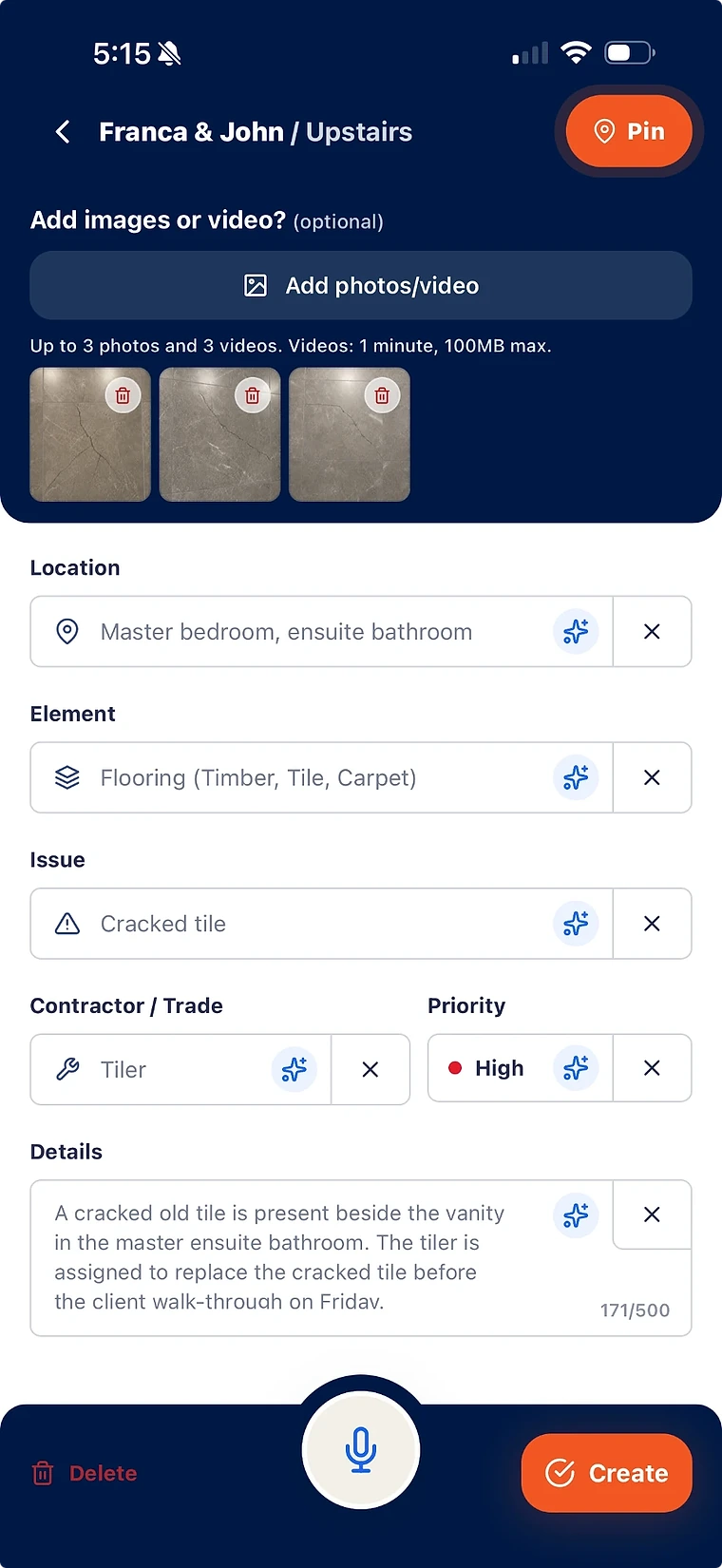
Inspect on a phone: photo evidence, voice note, floor-plan pin, trade, and priority on every defect.
Assign each defect to the responsible contractor before you leave site.
Verify the rectification yourself, then issue the inspection report from the same records.
What defect inspection software has to do
Recording the inspection is the easy half. The record only earns its keep if a contractor can act on it without a phone call and a second visit to explain what you meant.
- Location and element pinned on the floor plan, not described from memory later that night.
- Photo evidence and an issue description captured at the defect, while you are standing in front of it.
- Trade, priority, and responsible contractor attached at capture rather than sorted out afterwards.
- A status that reflects verified reality, so the open list is the real open list.
The inspections this covers on an Australian project
Defect inspections are not one event. The same defect record should carry through every walk from first fix to the end of the liability period.
- Quality walks and trade sign-off inspections during the build.
- Pre-handover inspections and the practical completion defect inspection.
- The client or owner walkthrough, where new items land on the same list.
- Defect liability period inspections after handover, on the original project record.
Findings become contractor work, not a PDF attachment
Emailing an inspection report to a contractor moves the paperwork, not the work. Assignment has to be part of the inspection record itself.
- Each defect is assigned with the repair context the contractor actually needs.
- Contractors see only their assigned items, not the whole project record.
- Completion proof is uploaded against the specific defect it belongs to.
- Your team verifies before anything is marked closed.
Re-inspection is where most inspection tools stop
The second and third pass over the same defect is the part that consumes site time. That is the part worth keeping structured.
- Reopened defects keep their full history, so repeat failures are visible rather than reset.
- Open, in progress, ready for verification, and closed are separated instead of blurred.
- Review open items by trade and responsibility before the next site visit.
- The final report shows the closed loop: found, assigned, rectified, verified.
What is defect inspection software?
Defect inspection software is used to run construction defect inspections and manage what they produce: each finding is captured with photos and a location, assigned to the responsible trade or contractor, tracked to rectification, verified, and reported. It differs from general inspection or checklist software in that the defect record, not the completed form, is the output.
How is it different from a checklist or forms app?
A checklist app is designed to prove an inspection happened. Defect inspection software is designed to close what the inspection found — contractor assignment, completion evidence, verification before closure, and a report generated from the live records.
Can contractors see the defect inspection results?
Contractors get focused access to the defects assigned to them, including the photos, location, and issue notes captured on the inspection. They can add activity and upload completion proof, but verification and the wider project record stay with the builder.
Does the inspection report include photos and locations?
Yes. Reports are generated from the same defect records captured during the inspection, so photos, floor-plan location, trade, priority, status, and closeout notes carry straight through to the client-ready PDF.
Can I use SiteWarden for punch lists and defects?
Yes. Use project lists to record work that needs finishing or fixing, with photos, locations, trades, priorities and statuses. The current app labels these records as defects; the same record can describe unfinished work or an issue that needs repair.
How do contractors take part?
Your team assigns responsibility and controls review and approval. Contractor replies through WhatsApp are forthcoming and are not included in the current trial. In that planned workflow, contractors will send photos, voice notes and progress updates without a SiteWarden account; the builder will still approve the work.
Bring your list.
We’ll walk you through it.
Unfinished work, defects and the details in between. See how the current app captures, organises and reports on them.