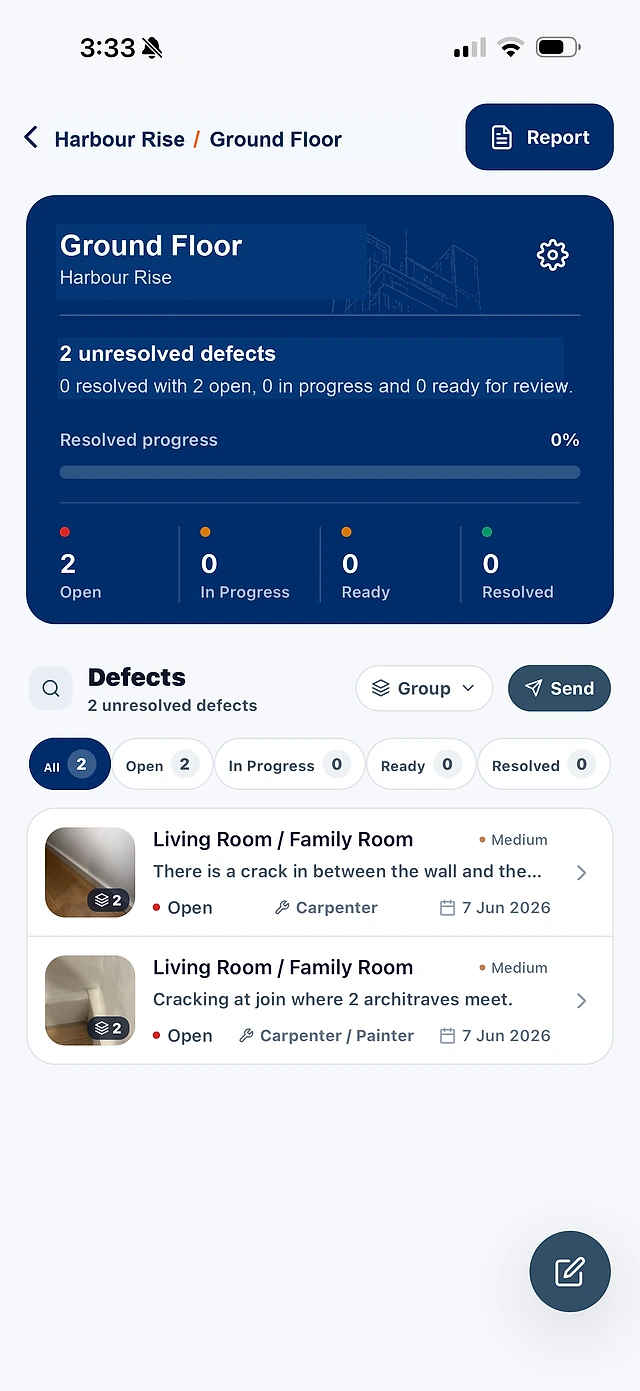
Use a list for work from a site walk, an area of the project or a handover review. Each item holds its own description and evidence.
Record incomplete work and defects using the same fields.
Keep photos and locations beside the work description.
Organise the records under the relevant project and list.
02
Make the next step easy to find.
A useful list tells the team what the work is, where it is and who is responsible. Priorities and statuses help you decide what to follow up.
Assign trade and contractor responsibility.
Use status and priority to find outstanding work.
Keep the original photos and details attached as work progresses.
03
Take the list from site to the office.
Professional and Business include the desktop workspace and your internal team. Coordinate the records captured in the mobile app and choose what goes into a report.
Work from the same project records.
Review the details before sharing.
Generate a PDF from the records you select.
BEFORE YOU GET STARTED
Good to know.
Can I use this for unfinished work as well as defects?
Yes. Use project lists for work still to finish and issues that need fixing. The current app labels the records as defects; each record can describe unfinished work, with the same photos, location, trade, priority and status.
What do you mean by a job list?
Here, a job list means a list of outstanding site items, such as fitting a door stop or finishing paintwork. SiteWarden organises those records with photos, location, trade and status. It is not a scheduling, quoting, invoicing or workforce-dispatch system.
Can I share the list as a report?
Yes. Select the records you want to include and generate a PDF with photos, locations, trades, priorities, statuses and notes.
SEE SITEWARDEN IN ACTION
Walk through it with us.
Bring your current workflow. See the app, ask questions and find the right fit for your team.