A clearer way to record every defect.
Download a free construction defect list or report worksheet. Record the issue, location, evidence, responsibility and status, then see the completed format in the illustrative SiteWarden sample PDF.
For builders, site supervisors, inspectors, and construction admins who need a consistent defect report format for practical completion and handover.
Start with an editable worksheet.
An editable list for individual defects, responsibility, evidence references and review.
Download defect list CSVAn editable worksheet for inspection context, findings, evidence and follow-up.
Download report worksheet CSVAdapt the fields to your project. The sample PDF shows app-generated report output; these standalone CSVs are not SiteWarden import files or approved technical inspection specifications.
Use an ID, location, trade, priority, status and photo reference for each item.
Use the defect list to organise follow-up and the worksheet to prepare a report.
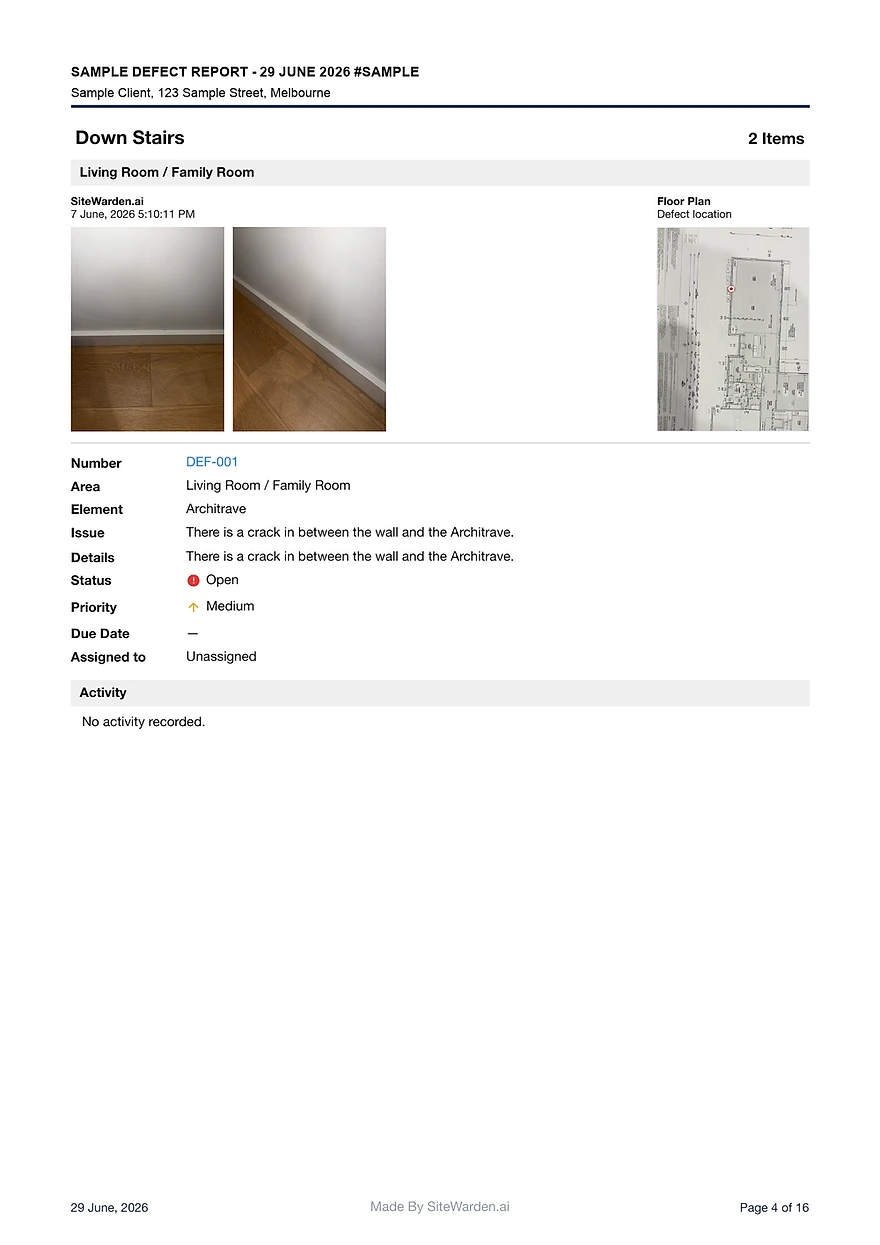
View the free sample report to see the completed format before you build your own.
What a defect report template should include
A defect report is only useful if every entry can stand on its own in a handover conversation. These are the fields that make that possible.
- Defect ID, so items can be referenced in meetings, emails, and rectification follow-up.
- Location and element, including level, room, and the specific component affected.
- Photo evidence attached to the finding it documents, with the relevant location and observation.
- Issue description, trade, and the contractor responsible for rectification.
- Priority, status, verification outcome, and closeout notes.
Keep a spreadsheet defect list usable
A spreadsheet can work as a defect list when the team keeps its references, evidence and updates organised. Agree who maintains the current version and how photos are matched to each finding.
- Give each item a stable ID and include it in the evidence reference.
- Record the location, observation, responsible follow-up and current status in the same row.
- Agree who updates the list and where the current copy is stored.
- Review the selected items and evidence before preparing a report.
Choose a defect list and report format
Use the free defect list CSV to track individual items, or the report worksheet to prepare inspection context and findings. The illustrative SiteWarden PDF shows app-generated output. The standalone CSVs are not app import files or ready-made PDF generators.
- The sample report includes defect IDs, photos, locations, trades, priorities, statuses, and closeout notes.
- SiteWarden generates a PDF from selected app records. The downloadable CSVs remain separate worksheets.
- Remove the illustrative entries and adapt the fields before using a worksheet for a live project.
Is there a free construction defect list template?
Yes. Download the editable defect list CSV and adapt its example rows for your project. It includes fields for location, issue, responsibility, status, evidence reference and review. It is a standalone spreadsheet, not a SiteWarden import file.
What is a defect report template?
A defect report template is a consistent structure for recording construction defects, with fields for ID, photos, location, issue, trade, contractor, priority, status, and closeout notes.
What format should a construction defect report be in?
A format the client can rely on: one entry per defect with photo evidence, location context, responsibility, and status, presented as a branded document rather than a raw spreadsheet.
Can I see a completed defect report example?
Yes. The free SiteWarden sample report shows a completed construction defect report with photos, locations, trades, priorities, statuses, and closeout notes.
How do I stop photos getting separated from defect entries?
Capture the photo against the defect record while you are on site. It stays attached to that item when selected for a report. Check that the photos and descriptions match before sharing the PDF.
Bring your list.
We’ll walk you through it.
Unfinished work, defects and the details in between. See how the current app captures, organises and reports on them.