A snag list people can act on.
Give every unfinished item or defect a location, description, photo, responsible trade and status. Use this structure to organise the work, and see the finished format in a free sample report.
For builders and site teams setting up a snagging list for practical completion, a client walkthrough, or a handover inspection.
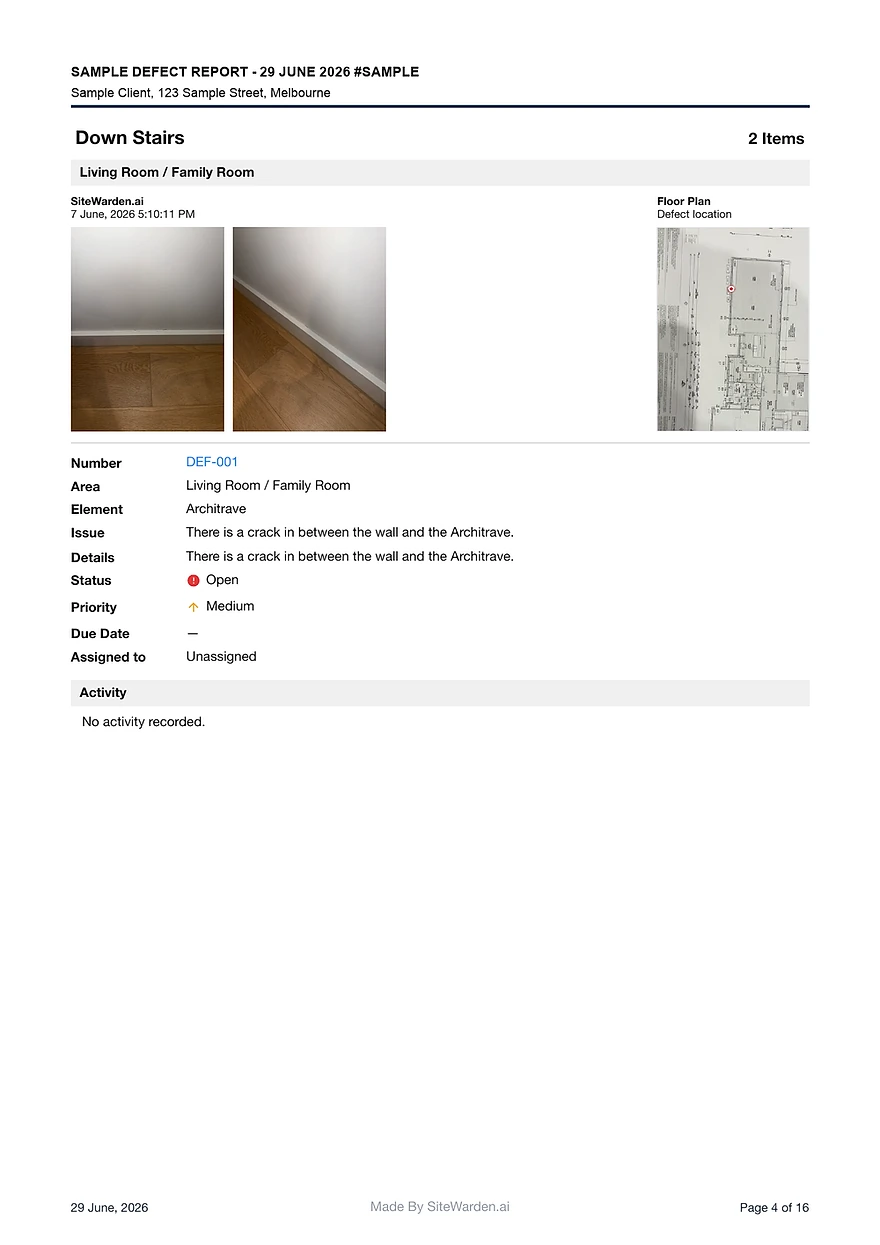
Every field a snag list needs: ID, location, element, issue, trade, priority, status, and owner.
A format that survives contact with fifty snags and six contractors.
A free completed example report showing the finished output.
What a snag list template should include
A snag list is only useful if someone can act on each line without asking questions. Every snag needs enough context to be assigned, fixed, and verified.
- Snag ID and date raised, so items can be referenced in conversations and reports.
- Location and element: level, room or area, and the thing that is wrong.
- Issue description and photo evidence captured at the point of inspection.
- Trade, responsible contractor, priority, status, and verification sign-off.
Why spreadsheet snag lists break down
An Excel snag list works for the first walk. It breaks when the count grows, because the evidence lives outside the sheet and the status column depends on someone remembering to update it.
- Photos sit in camera rolls and message threads, disconnected from the row.
- Contractors cannot update their own items, so status goes stale immediately.
- Nobody can prove a fix happened — the sheet says closed because someone typed closed.
- The client report has to be rebuilt by hand at the exact moment there is no time.
Start from the finished report, not the blank sheet
The fastest way to design a snag list is to look at what the client should receive at the end. Download the free sample defect report to see the finished format, then work backwards.
- The sample shows real-world structure: IDs, locations, photos, trades, priorities, statuses, and closeout notes.
- If your template cannot produce that output, the gap is what the spreadsheet is costing you.
- SiteWarden produces the report from the same records captured on the walk — no rebuild.
What should a snag list template include?
At minimum: a snag ID, date raised, location, element, issue description, photo evidence, responsible trade or contractor, priority, status, and a verification column so closure is confirmed rather than assumed.
Is there a free snag list example I can look at?
Yes. The SiteWarden sample report is a free completed example showing snag IDs, photos, locations, trades, priorities, statuses, and closeout notes in a client-ready format.
Snag list or defect list — which term should I use?
Use the term your team and contract use. Snag lists and punch lists can include unfinished work as well as defects. A defect list focuses on work that needs correcting; the location, evidence, responsibility and status fields are useful for all three.
Can I use SiteWarden for punch lists and defects?
Yes. Use project lists to record work that needs finishing or fixing, with photos, locations, trades, priorities and statuses. The current app labels these records as defects; the same record can describe unfinished work or an issue that needs repair.
How do contractors take part?
Your team assigns responsibility and controls review and approval. Contractor replies through WhatsApp are forthcoming and are not included in the current trial. In that planned workflow, contractors will send photos, voice notes and progress updates without a SiteWarden account; the builder will still approve the work.
Bring your list.
We’ll walk you through it.
Unfinished work, defects and the details in between. See how the current app captures, organises and reports on them.