Keep the quality finding and its evidence together.
Construction quality assurance software helps teams keep quality processes and records consistent. SiteWarden supports the field findings and defect follow-up within that process: capture the issue, retain its location and evidence, make responsibility clear and prepare a report.
For builders, site supervisors and quality managers who need usable records from each site walk.
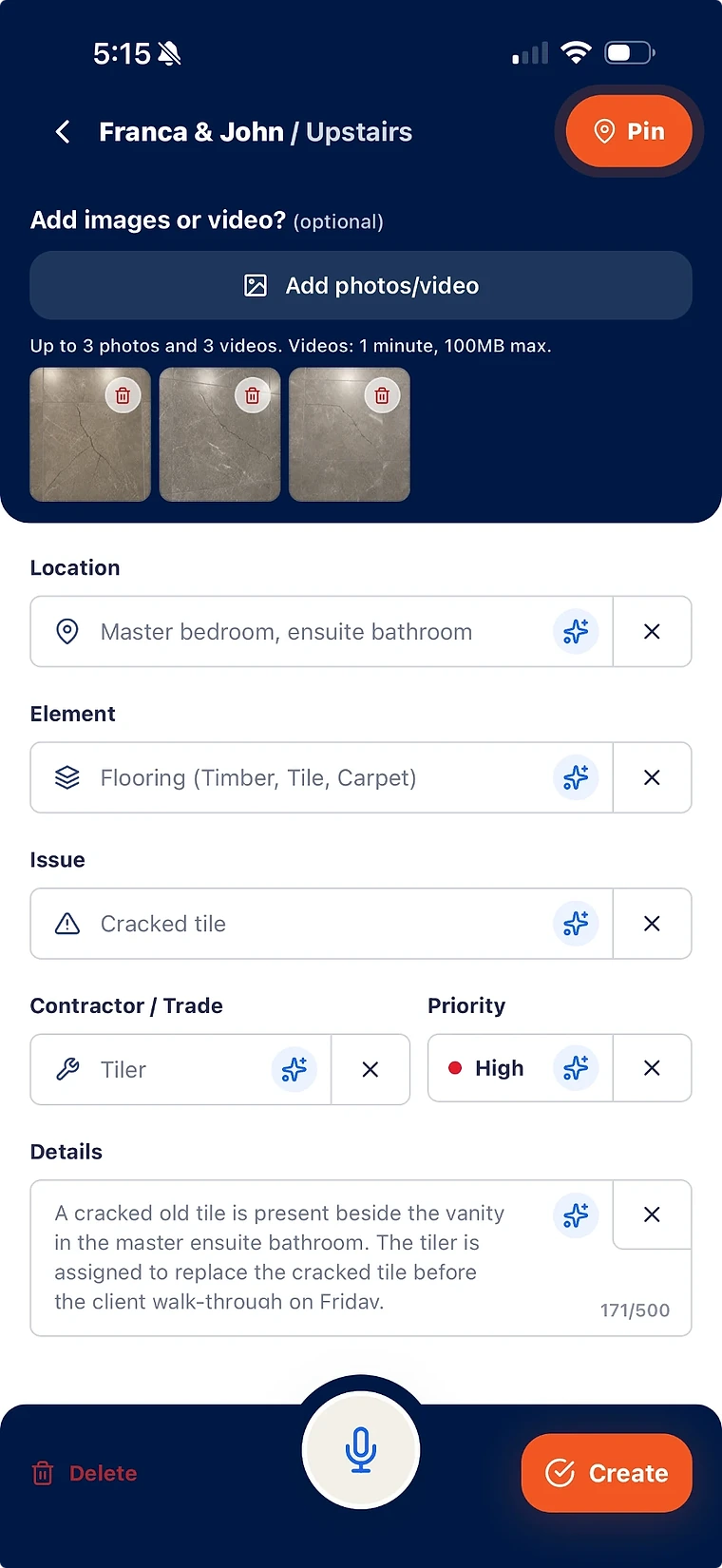
Record the location, issue and evidence during the walk.
Keep responsibility and review with the project team.
Build a PDF report from the records you already captured.
Choose the quality workflow you need to manage
A quality plan sets out what the project expects, who checks it and which records must be retained. A site finding records what someone actually observed. Start your software review with those two jobs. SiteWarden focuses on the findings, outstanding work and defect evidence that need follow-up.
- Bring the approved drawings, specifications and inspection requirements into your site process.
- Use a clear location and issue description for each finding.
- Keep formal inspection and test plans, hold-point releases and certification in the approved project system.
Make each record usable by the next person
A photo of a damaged finish is easier to act on when it has a room, an element, a work description and a trade. SiteWarden keeps those details in a Project → List → Defect structure. Paid plans add floor-plan pins and photo markup when the location needs more explanation.
- Group a site walk or work area into a list.
- Keep photos, video and spoken context with the item.
- Review AI suggestions before saving; AI fills empty fields rather than approving the work.
Capture quality findings when the site is offline
SiteWarden supports offline capture in the mobile app. Record the finding and its photos on site, then sync when a connection is available. This supports defect follow-up within a quality process; it does not replace formal inspection and test plans or hold-point approvals.
- Prepare the device and project before a walk where coverage may be poor.
- Review the location, work description and evidence before saving.
- After reconnecting, check that records have synced before relying on online access or sharing a report.
Keep reporting connected to the site record
Reporting becomes repeated work when someone must find the photos again, retype the descriptions and match each issue to a room. SiteWarden creates PDF reports from selected records, retaining their photos, locations, trades, priorities, notes and status.
- Preview the selected records before sharing a report.
- Use QR evidence links for read-only details, photos and playable video.
- Share reports with intended recipients: anyone holding the PDF can open its evidence links.
Inspect the output before deciding
The Banksia Townhouse sample gives you something concrete to review: a 16-page PDF with 10 outstanding items across three site lists. Its inspection items and photos are illustrative. Use it to judge the report layout and evidence journey, then bring your own list to a demo.
- Can a trade identify the exact location and requested work?
- Can a reviewer distinguish a reported repair from a reviewed item?
- Can the recipient find the evidence without creating an account?
Test the scope with your team
Professional is AUD $14.99 per month and Business is AUD $20.99 per month. Both include the internal team, desktop access and a 14-day free trial. Mobile capture can work offline and sync after reconnection; desktop and online services need a connection.
- Test field capture with a real walk rather than an empty demo project.
- Check who is permitted to review and approve records.
- Confirm that formal QA forms and specialist testing requirements remain covered by your project process.
What is construction quality assurance software?
Construction quality assurance software helps teams organise quality processes and retain consistent records. SiteWarden supports site findings, defect follow-up, evidence and PDF reporting within a construction quality process.
Can a construction team capture quality findings offline?
Yes. SiteWarden supports offline capture in the mobile app and syncs records when a connection is available. Desktop access and online services require connectivity. Formal quality approvals and inspection and test plans remain in the project’s approved system.
Does SiteWarden provide inspection and test plans or hold-point approval?
SiteWarden currently focuses on punch lists and defect records. Formal inspection and test plans, hold-point releases, specialist test results and compliance approvals need to remain in the approved project process or system.
How can SiteWarden reduce report preparation work?
SiteWarden builds a PDF from selected site records, including their photos, locations, trades, priorities, notes and status. This avoids assembling the same record again in a separate document. The time saved depends on the project and its reporting process.
Bring your list.
We’ll walk you through it.
Unfinished work, defects and the details in between. See how the current app captures, organises and reports on them.