Make quality follow-up easier to see.
Keep inspection findings, unfinished work and defect repairs in structured project lists. Capture the evidence, assign responsibility and let your team review what happens next.
Built for quality managers, builders, and site teams who own quality outcomes and need records that hold up at handover and beyond.
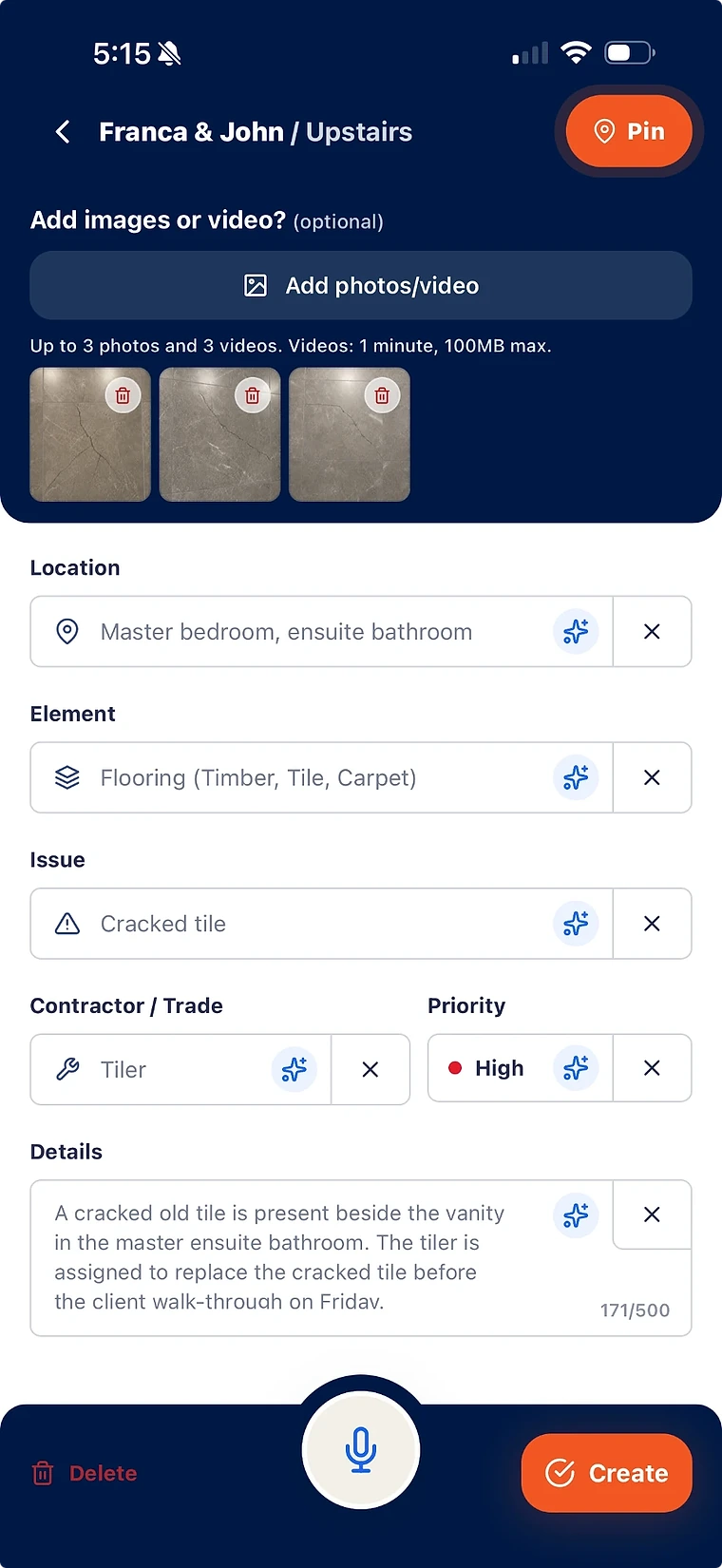
Consistent, structured defect records instead of ad-hoc photos and messages.
Contractor rectification with evidence requirements and restricted access.
Verification before closure, so quality standards are enforced rather than assumed.
What quality control software covers on site
Quality assurance sets the standards; quality control checks the work against them. On site, QC lives in inspection walks and the defect records they produce.
- Quality walks that capture nonconforming work as structured defect records.
- Consistent fields — location, element, issue, trade, priority — across every record.
- Open items visible by project, contractor, trade, and status at all times.
- A closeout record that shows the standard was enforced, not just written down.
Verification is the difference between QC and a wish list
A defect marked closed on a contractor’s say-so is not quality control. SiteWarden separates completion claims from verified closure.
- Contractors upload completion proof against each assigned defect.
- An inspector or the project team verifies the fix before the item closes.
- Reopened items keep their history, so repeat failures are visible.
- Trade, responsibility and status help the team prioritise follow-up.
Where ITPs and NCRs fit
Inspection and test plans schedule the checks; non-conformance reports document the failures. The rectification loop in between is where most quality systems leak.
- Keep the ITP in your quality management system — it plans the inspection sequence.
- When a check fails, the finding needs an owner, evidence, and verified rectification.
- SiteWarden runs that rectification loop as a structured, reportable record.
Quality records your team can refer to
Quality control is also evidence. Structured records help the team explain what was captured, what was assigned and what evidence is available.
- Every defect keeps capture evidence, assignment history, proof, and verification.
- Reports package the quality trail for clients, certifiers, and consultants.
- The record survives the project team moving on.
What is construction quality control software?
It is software that helps site teams check work against the required standard and manage what fails the check: recording defects consistently, assigning rectification to contractors, verifying fixes, and keeping the evidence trail.
What is the difference between QA and QC in construction?
Quality assurance is the system that sets standards and processes — ITPs, method statements, checklists. Quality control is checking the actual work against those standards and correcting what fails. SiteWarden focuses on the QC side: the defect and rectification loop.
Does SiteWarden manage inspection and test plans (ITPs)?
No. ITPs and quality system documents stay in your QMS. SiteWarden owns what happens when an inspection finds nonconforming work: the structured defect record, contractor rectification, verification, and reporting.
Can quality managers enforce closure standards in SiteWarden?
Yes. Defects are not closed on a contractor’s claim — completion proof is reviewed and verified by your team before an item is marked closed, and reopened items keep their full history.
Can I use SiteWarden for punch lists and defects?
Yes. Use project lists to record work that needs finishing or fixing, with photos, locations, trades, priorities and statuses. The current app labels these records as defects; the same record can describe unfinished work or an issue that needs repair.
How do contractors take part?
Your team assigns responsibility and controls review and approval. Contractor replies through WhatsApp are forthcoming and are not included in the current trial. In that planned workflow, contractors will send photos, voice notes and progress updates without a SiteWarden account; the builder will still approve the work.
Bring your list.
We’ll walk you through it.
Unfinished work, defects and the details in between. See how the current app captures, organises and reports on them.