Give every finding a clear place in your report.
Keep the issue, its location and the supporting photos together. Use this building defect report structure for a consistent site record, then explore a completed PDF example.
For builders, site teams, and inspectors preparing building defect reports for practical completion, owner walkthroughs, and the defect liability period.
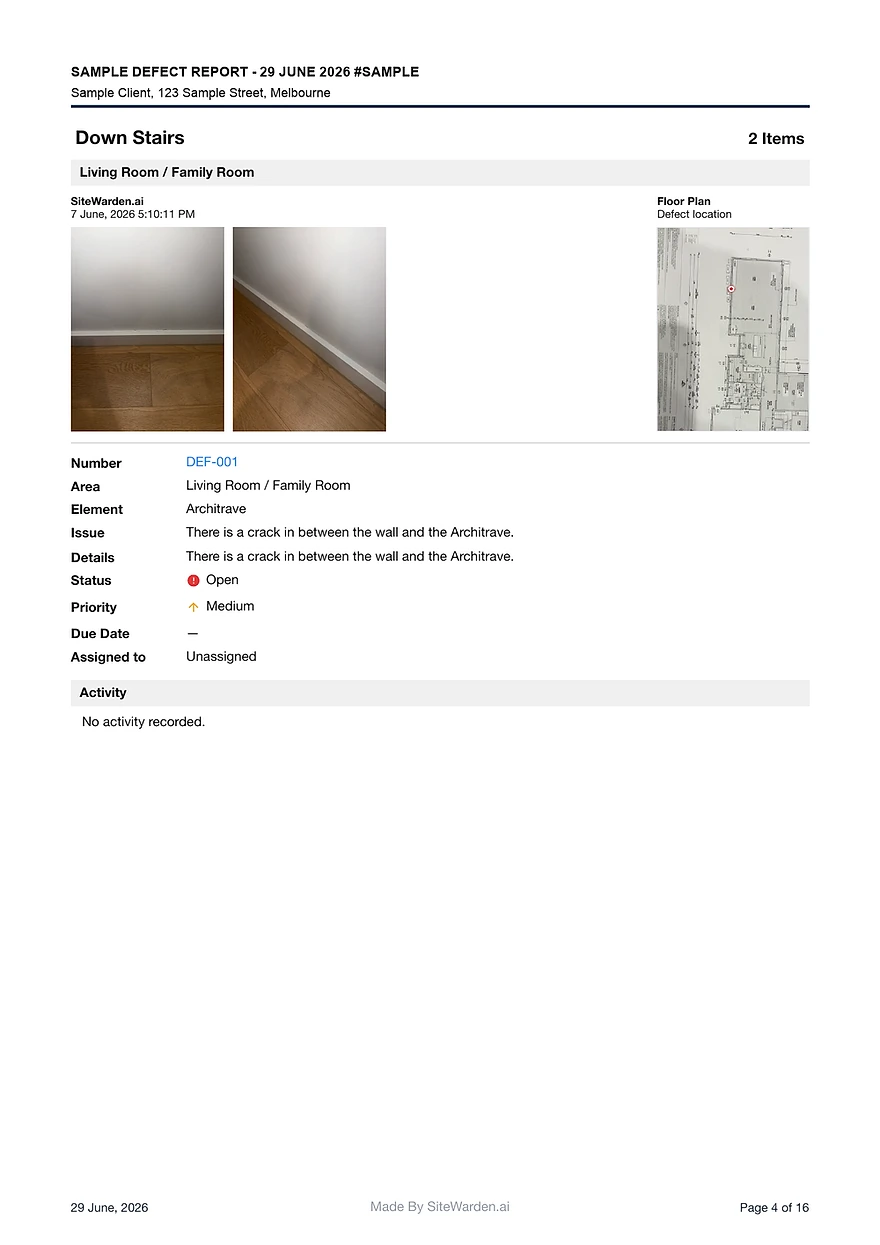
Report entries keep photos, locations, trades, priorities, and statuses together per defect.
The same structure serves practical completion, handover packs, and DLP follow-up.
View the free sample report to see a completed building defect report before writing your own.
What a building defect report should contain
A building defect report is a record the client, the contractor, and the builder can all act on. That takes more structure than a photo dump with captions.
- A numbered entry per defect with a clear identifier.
- Location detail: level, room or area, and the building element affected.
- Photo evidence attached to each entry, captured when the defect was raised.
- The issue description, responsible trade, and assigned contractor.
- Priority, current status, and verification or closeout notes.
Organise by location, close out by contractor
Reports read best organised by location, but rectification runs by contractor. A good template supports both views from the same records.
- Group entries by level and room so the client can walk the report.
- Filter the same items by trade and contractor for rectification follow-up.
- Keep verification with the builder so the report reflects checked work, not claimed work.
Copy the finished example, not a blank table
The SiteWarden sample report is a completed building defect report you can use as the target format for your own projects.
- It shows defect IDs, photos, locations, trades, priorities, statuses, and closeout notes.
- SiteWarden produces the same report from records captured on site, with no manual assembly.
- The structure stays consistent from the first site walk to the final handover pack.
What is a building defect report?
A building defect report documents defective or incomplete work in a building, with evidence, locations, responsibility, and status, usually prepared around practical completion or during the defect liability period.
Who prepares a building defect report?
Usually the builder, site supervisor, or an inspector. The key is that entries are recorded consistently and verified before the report is issued to the client or contractor.
What format should a building defect report use?
One entry per defect with an ID, photos, location, element, issue, trade, contractor, priority, and status, presented as a branded document the client can navigate by location.
Can I see a building defect report example?
Yes. The free SiteWarden sample report is a completed example with photos, locations, trades, priorities, statuses, and closeout notes.
Can I use SiteWarden for punch lists and defects?
Yes. Use project lists to record work that needs finishing or fixing, with photos, locations, trades, priorities and statuses. The current app labels these records as defects; the same record can describe unfinished work or an issue that needs repair.
How do contractors take part?
Your team assigns responsibility and controls review and approval. Contractor replies through WhatsApp are forthcoming and are not included in the current trial. In that planned workflow, contractors will send photos, voice notes and progress updates without a SiteWarden account; the builder will still approve the work.
Bring your list.
We’ll walk you through it.
Unfinished work, defects and the details in between. See how the current app captures, organises and reports on them.