Start with the site work your team needs to follow up.
Construction management software can cover estimating, budgets, programmes, contracts and site work. For a small builder, the useful starting point is the job that keeps creating extra admin. SiteWarden handles punch lists, construction defects and the evidence needed to follow them through.
For small builders who want a clearer field-to-office record for unfinished work and defects.
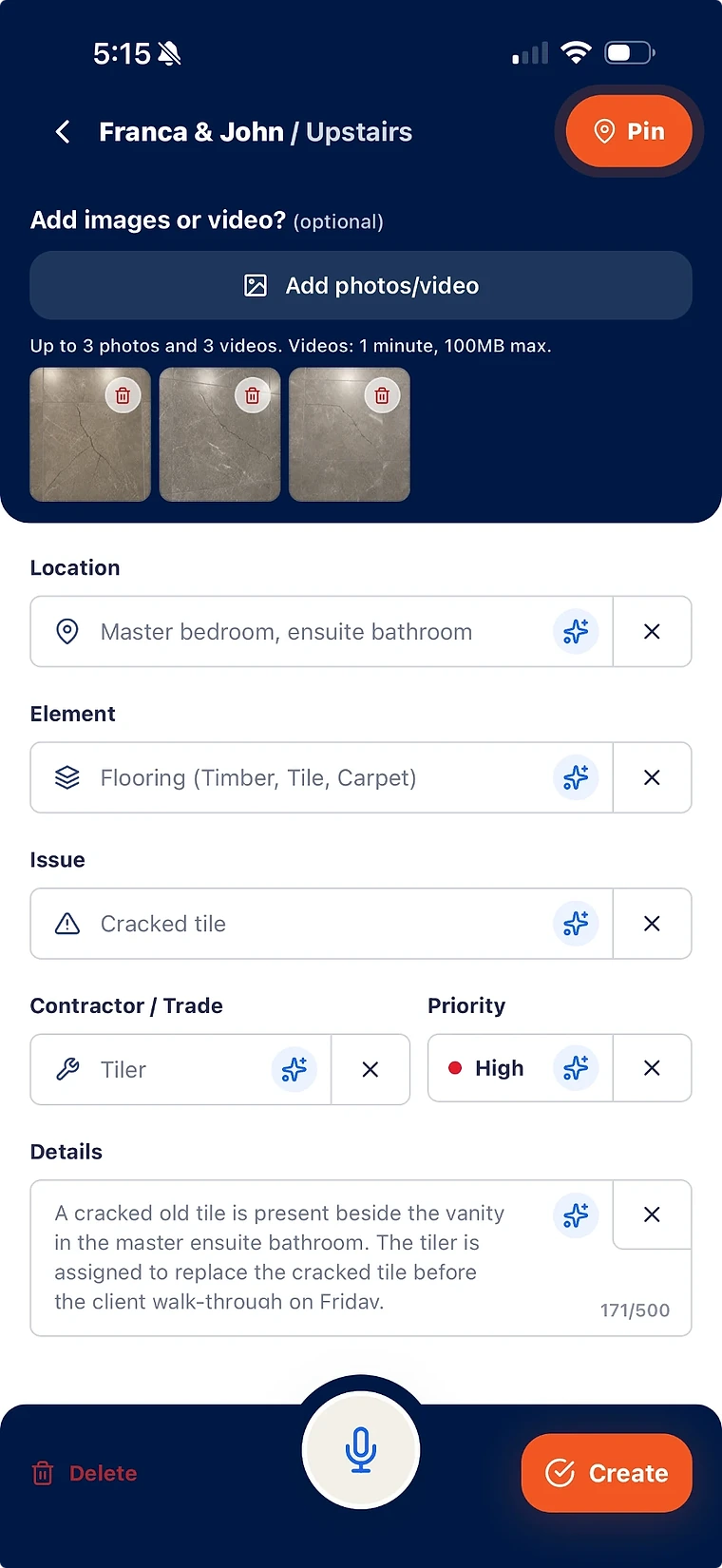
Keep the work description and photos in one record.
Review site lists from the paid-plan desktop workspace.
Prepare reports from the captured items.
Write down the job before choosing the platform
Take a recent week and identify where information was reconstructed. Was it pricing a variation, checking the programme, or turning a site walk into a defect report? These are different software requirements. A field-recording tool should be evaluated against the capture and follow-up problem it can actually solve.
- List the tools you already use for estimating, accounts and scheduling.
- Choose one real punch list or defect walk as the trial exercise.
- Record the capture, review and reporting steps your team currently repeats.
Give the office the same record as the site
SiteWarden organises records by project and list. A supervisor can capture a location, element, issue, trade, priority, status and evidence. Professional and Business include desktop access for the internal team, so the office can work from those records rather than a fresh collection of photos and messages.
- Name lists around a work area, site walk or closeout activity.
- Keep original issue information available for review.
- Keep review and approval with authorised project users.
Check the field conditions during the trial
A site trial should include the conditions that affect real work. Capture an item while disconnected, reconnect and check the sync. Try a spoken description, review the suggested fields and correct them before saving. Then create a report that someone outside the team can read.
- Offline support applies to mobile capture; online features need a connection.
- AI assistance fills empty fields and requires human review.
Compare the plan cost and actual inclusions
Starter is free for one person, one active project and up to 50 records. Professional costs AUD $14.99 per month and Business AUD $20.99 per month. Both paid plans include the internal team and a 14-day trial. Use the pricing comparison to check controls, branding and analytics against your needs.
- Count the people who need internal desktop access.
- Check active project and record limits before relying on a plan.
- Assess the output using the illustrative 16-page sample defect report.
Keep the wider business requirements visible
SiteWarden’s current scope is punch lists, defects, review and reporting. Estimating, accounting, procurement, construction scheduling, RFIs, submittals and formal QA approvals require the appropriate business or project tools. Bring your current software list to a demo so the discussion stays specific to the record you want to improve.
- Compare a focused defect workflow with a broader platform using the same site exercise.
- Check how reports are shared with owners and trades.
- Measure capture and reporting time yourself before forecasting savings.
What construction management software does a small builder need?
The answer depends on the work the builder needs to manage: estimating and accounts, schedules and contracts, or field records and defect follow-up. SiteWarden focuses on construction punch lists, defects, review and reports.
Can SiteWarden manage construction budgets and schedules?
SiteWarden currently handles punch lists and defect records. Construction budgets, estimating, accounting, procurement and scheduling need the appropriate separate tools.
Is there a free SiteWarden plan for a small builder?
Starter is free for one person, one active project and up to 50 records. Professional and Business include the internal team, desktop access and a 14-day free trial. Current prices and plan inclusions are on the pricing page.
Bring your list.
We’ll walk you through it.
Unfinished work, defects and the details in between. See how the current app captures, organises and reports on them.